Summary
Preview example vehicles at ambient spawn points in Workbench and spot filter, clearance, and placement problems before running a mission.
Description
Ambient Vehicle Spawn Diag adds Workbench diagnostics for vanilla ambient vehicle spawn points in Arma Reforger.

It is a mission-making and configuration-validation tool. The addon does not replace the vanilla ambient vehicle spawning system and does not add a separate vehicle spawning system.

Features
• Prevents placement of an ambient vehicle spawn point when the current world configuration cannot support it.
• Checks that exactly one editable GameMode is available.
• Warns when the GameMode layer is locked.
• Checks that Spawn Vehicles is enabled in the GameMode Test Game Flags.
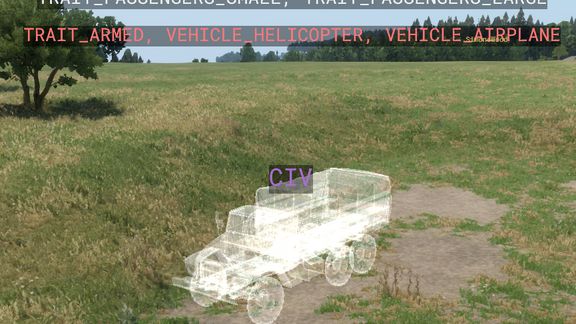
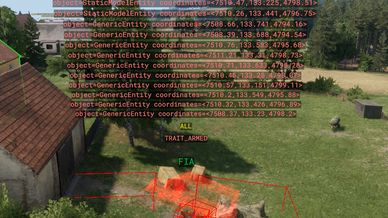
• Shows a translucent hologram of an example vehicle at every loaded ambient spawn point. The example comes from the point's filtered catalog and the vehicle-bounds reference; it is not a prediction of the exact vehicle that will spawn.
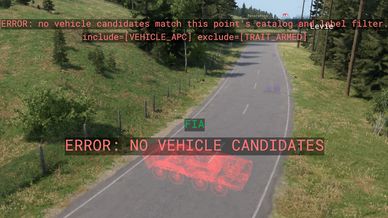
• Keeps the hologram white when no clear problem is detected, or turns it red for a filter, catalog, free-position, or visible vehicle-preview overlap. A same-faction example is marked as a fallback if matching candidates cannot be used.
• Shows the point's faction above each hologram in the faction colour. The hologram follows point movement and rotation.
• Marks static physics objects with oriented red wireframes when their model bounds intersect a spawn area. Static-object and spawn-area overlaps produce placement warnings with coordinates; failure to find an empty terrain position is a separate error. Spawn-area warnings alone do not turn a hologram red; overlapping example-vehicle bounds do. Preview overlap is advisory and does not prove runtime spawn failure.
• Provides Next and Toggle vehicle hologram commands under Plugins → [ME] Vehicle Spawn → Preview.
• Displays conflicting-label and empty-filter errors as separate messages above the point. Empty results include the configured include/exclude labels; an unavailable catalog is shown as a warning.
• Draws the configured labels of a point above it: included labels in their own colours, excluded labels in red, and ALL when a list is empty. The two passenger-capacity labels share one comma-separated line.
• Includes worlds/ME_TestWorld.ent with valid and intentionally invalid examples for testing the diagnostics.
• Checks that a FactionManager is present in the world.
• Validates the faction affiliation of incoming ambient vehicle spawn-point prefabs.
• Prevents placement when a spawn point requires a faction unavailable in the world's FactionManager.

Important notes
• Visual checks and object-bound intersections are editor diagnostics and do not guarantee a successful vehicle spawn at runtime.
• This addon is designed for vanilla Arma Reforger ambient vehicle spawn points.
• It has been tested only with vanilla game content.
• Compatibility with other mods is not guaranteed, especially mods that override SCR_AmbientVehicleSpawnPointComponent, SCR_AmbientVehicleSystem, or World Editor placement callbacks.
• Some layers in ME_TestWorld intentionally contain conflicts and invalid configurations. They are demonstration cases, not ready-to-use mission content.

How to use
1. Open your world in Workbench.
2. Configure exactly one editable GameMode.
3. Enable Spawn Vehicles in Test Game Flags.
4. Add a FactionManager to the world and configure the required factions.
5. Place a vanilla Ambient Vehicle Spawnpoint prefab.
6. Use the visual indicators and warning dialogs to correct placement or configuration issues.
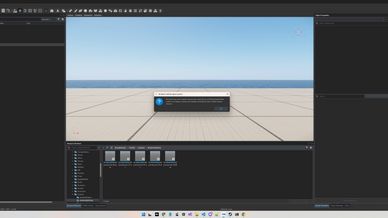
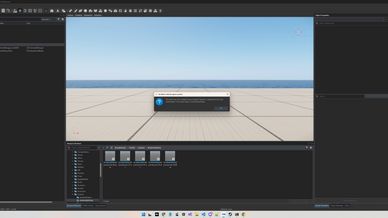
7. For a manual check of the current world, open Workbench Plugins and run “Check ambient vehicle spawning”.

Checking existing Conflict scenarios
You can also use the mod to inspect existing Conflict scenarios. Open a scenario in World Editor with the mod loaded: visual indicators help identify conflicting labels, overlapping spawn areas, and potential obstacles near vehicle spawn points. You do not need to enter Game mode to view these indicators.

Source code and test project
Source code, the test project, and vanilla-world audit reports are available on GitHub:
https://github.com/trueMedoed/Vehicle-Spawn
The test project is intended for Workbench and may contain experimental changes not yet included in the Workshop release.
License
Arma Public License (APL)