Summary
Independent left/right thumbstick deadzones and response curves, automatic movement compensation, and selectable input hints for controller-plus-mouse play.
Description
Beta release: Core features have been tested on PC. Broader testing is ongoing, and behaviour may change based on feedback.

Thumbstick calibration, response curves and input-hint control for Arma Reforger.

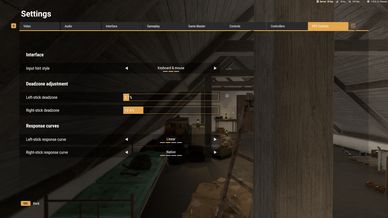
Open Settings > PSY Controls.

LEFT AND RIGHT STICK DEADZONES
Adjust each physical thumbstick independently from 0–50%, in 0.1% steps.
Default: 7.5% per stick when no valid saved setting exists. Existing valid choices are retained.
Zero removes the native axis deadzone and may expose controller drift. Choose the smallest value that keeps your stick stable at rest.

RESPONSE CURVES
Choose independently for each physical stick:
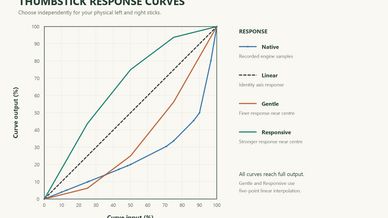
• Native — retains the existing response, or restores the response captured before a PSY curve override.
• Linear — an identity mapping at the exposed native curve stage.
• Gentle — finer response near centre compared with Linear.
• Responsive — stronger response near centre compared with Linear.

Native is the default for both sticks. Left and Right always describe the physical sticks, including when their bindings are swapped.
The controls using that stick inherit its selected deadzone and response curve.
Gentle and Responsive use five-point linear interpolation. Curves act per axis; native processing also influences physical response and response at different angles.

ON-FOOT MOVEMENT COMPENSATION
Native movement thresholds can make small analogue inputs respond unevenly as you change direction, particularly between straight and diagonal movement. PSY Controls compensates for these thresholds to make fine movement and gradual changes of direction more consistent.

Compensation works automatically while standing, crouched and prone. Native free-look behaviour is retained.

The game retains its native movement speeds and animations, including directional speed differences. Compensation does not make character speed identical in every direction.

INPUT HINT STYLE
• Auto — native automatic hint presentation.
• Keyboard & mouse — fixed keyboard/mouse presentation for the covered shared-button and quick-slot hints.
• Controller — fixed controller presentation for those hints.

For analogue movement with mouse aiming, try Keyboard & mouse. Earlier controlled tests and a recent short peer comparison show reduced large application frame-time spikes with fixed hints. Residual hitching remains, and the recent comparison did not improve average FPS or every smoothness measure. This is a partial mitigation for ARGF-191, not a complete fix.
Hint style changes presentation while retaining actual bindings and native input-device selection. Other native hint paths may retain their own behaviour.

SAVED SETTINGS
Your PSY Controls choices are saved locally across sessions and restarts.
Before removing the addon, select Native on both sticks while it is still loaded to restore the captured curves.

TEST STATUS
Tested on PC with an Xbox controller and with analogue movement plus mouse aiming. Testing so far supports working settings, saved preferences and Native curve restoration. Fixed keyboard/mouse hints reduce large frame-time spikes during mixed input, though residual hitching remains.

Testing is ongoing. Feedback from more players, devices and mod combinations is welcome.

**Feedback & bug reports**
Suggestions or issues? Contact **psyworks.dev** on Discord. For bugs, please describe what happened and include your platform, mod version, and a screenshot or clip if possible. Your help is appreciated.

REQUIREMENTS
Base Arma Reforger only.

RELATED REPORT
https://report.bistudio.com/issues/ARGF-191
License
Arma Public License Share Alike (APL-SA)