Summary
You decide which items the Arsenal and Bacon Loadout Editor show, which vehicles depots give out, and how many vehicles each faction may have. Set in game with #qm; kept across restarts.
Description
TOP: QUARTERMASTER

You decide what the arsenal issues, which vehicles players can take and how many each faction may have at once. One list for the whole server, set in game by Game Masters and admins, saved on the server and sent to every player.

OUT OF THE BOX
Every item and vehicle stays available, with no vehicle limits, until you change something. Switch "items not on the list" (or "vehicles not on the list") to HIDDEN and the list becomes an allow list: only what you show is offered.
Loadout saving works in every mission, Game Master worlds too: where a faction has no saved loadout, the Quartermaster adds the game's own.

FOR GAME MASTERS AND ADMINS
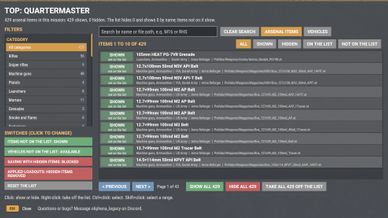
Type #qm in chat to open the Quartermaster menu.
- Tabs: ARSENAL ITEMS (everything this mission's arsenals can offer, modded factions included), VEHICLES and LIMITS, with filters and a search box.
- Click an entry's SHOWN/HIDDEN box to show or hide it; right-click the box takes it off the list (its switch decides it again).
- Click an entry to select it, Shift+click another for every entry between, Ctrl+click to add or take one out. The buttons below act on the selection; with nothing selected, on everything the filters and search show (big changes ask for a second click).
- Switches: items not on the list SHOWN or HIDDEN; vehicles not on the list AVAILABLE or HIDDEN; saving with hidden items BLOCKED or ALLOWED; hidden items in applied loadouts REMOVED or KEPT. With an allow list for items, remember clothing, packs and ammunition too.
- RESET THE LIST (click twice) empties it, vehicle limits and groups too.
Only Game Masters and admins can open the menu or change the list; the server checks every change.

WHAT A HIDDEN ITEM DOES
- It disappears from every arsenal box, weapon rack and the Bacon Loadout Editor, for every faction that has it. A request from a screen opened before the change is refused.
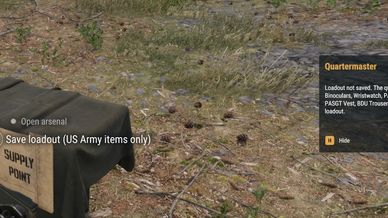
- A loadout that carries it can't be saved at an arsenal or in the Bacon Loadout Editor; the player is told which items are the problem. (Bacon's admin loadouts skip this check.)
- When a saved loadout is applied (arsenal or Bacon), hidden items are taken off and the player is told which.
- The factions' default role loadouts and Game Master spawning are not affected.

WHAT A HIDDEN VEHICLE DOES
- Vehicle depots stop offering it; a request from a screen opened before the change is refused.
- Ambient vehicle spawn spots spawn another allowed vehicle that fits, or stay empty. A hidden vehicle still parked unused on its spot is replaced; vehicles in use are left alone.
- Game Master spawning, mission-placed and objective vehicles are not affected.

VEHICLE LIMITS
On the LIMITS tab, per faction: at most so many cars, trucks, armour, helicopters and airplanes at once. A group is your own set of vehicles with one shared limit, for each faction: put every helicopter type in a group with a limit of 4 and no faction has more than 4 at once, in any mix.
- Every vehicle that exists counts, wherever it came from: empty, damaged or under repair too. Its slot frees up only when it is destroyed or deleted.
- Vehicle depots and building mode refuse one over a limit and tell the player why, e.g. "US helicopters: 4 of 4 in use".
- Game Masters and ambient spawn spots are never blocked; their vehicles still count.

THE BACON LOADOUT EDITOR
Not required. It reads the game's arsenal, so the list applies to it without changing Bacon. If the list changes while it is open, it closes so it can be opened again.

CHAT AND RCON COMMANDS
#qm - open the menu
#qm hide <item>, #qm show <item>, #qm clear <item> - items or vehicles, several separated by ;
#qm undecided show|hide, #qm vehicles show|hide - what isn't on the list
#qm saving block|allow, #qm applied remove|keep
#qm limit <faction> <class> <number|none> - e.g. #qm limit US helicopters 4
#qm group <name> = <number|none>, + <vehicle>, - <vehicle>, delete, rename <new name>
#qm status, #qm limits, #qm list hidden|shown
#qm reload - read the saved file again; #qm reset confirm - empty the list
An item or vehicle is its prefab with its GUID ({5A0A34F3C1E5F5A8}Prefabs/Weapons/...et), its GUID, or its path.

THE SAVED FILE
Everything lives in TOP_Quartermaster.txt in the server's profile folder: plain text, one line each. Edit it while the server is stopped (or edit it and type #qm reload), or copy it to another server.

COMPATIBILITY
- Works with RHS and other item and vehicle mods; the menu shows which mod each comes from.
- Other mods that change arsenals (WCS Loadout Editor, universal arsenals, GRS) work alongside. Load TOP: Quartermaster after them.
- Use its vehicle limits instead of another vehicle limiter mod, not alongside one.
- The arsenal's Resupply action still refills magazines for the gun a player carries.
- Every player needs the mod (it is a normal server mod).

Works alongside TOP: Vehicle Penetration Rules, TOP: Weapon Damage Rules and TOP: Valuable Intel.

Questions or bugs? Message oliphena_legacy on Discord.
License
Arma Public License (APL)