Summary
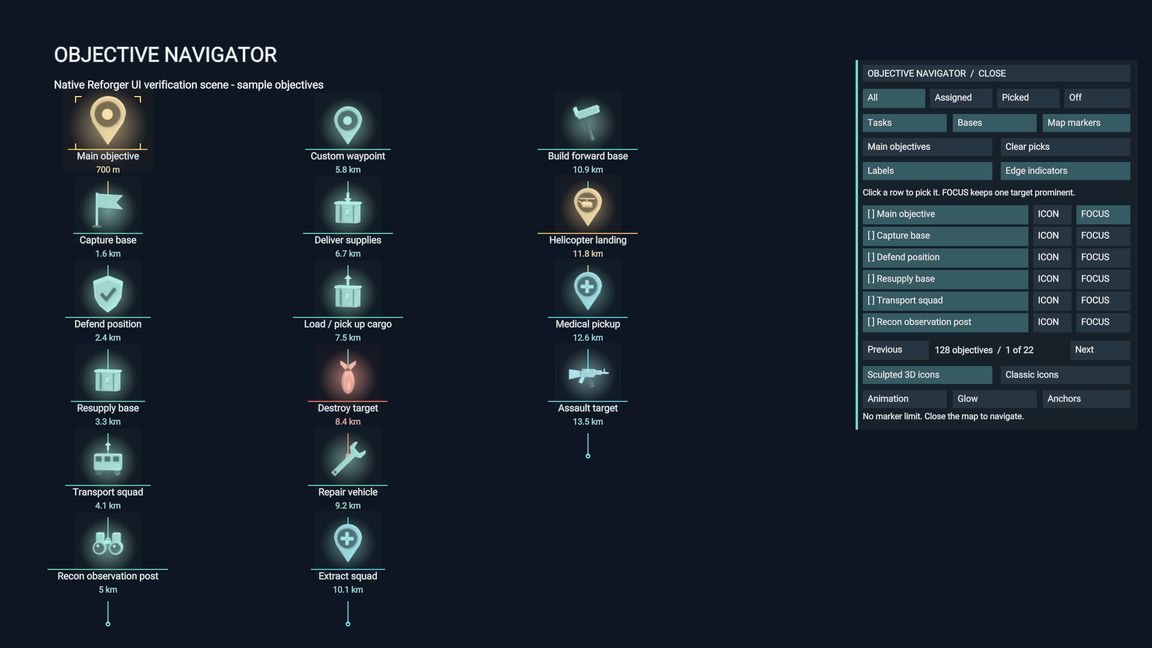
Pilot HUD objective markers with 16 original animated icon shapes, automatic objective naming/type selection, distinct colors and custom labeled map pins.
Description
Objective Navigator displays available mission objectives in the pilot HUD.
Open the player map with M and select OBJECTIVE NAVIGATOR / OPEN. Choose All,
Assigned, Main or Picked objectives, source filters, optional text, animation,
glow, colors and per-objective icon overrides.

Sixteen original icon shapes cover locations, capture, defend, supply, transport,
recon, waypoints, delivery, load, destruction, repair, extraction, construction,
landing, medical and assault. Air support uses the bomb/destruction icon.
Native task types and recognized objective names select icons automatically.
Completed, hidden and faction-inaccessible tasks are filtered.

Double-click the map to create a custom pin, select an icon and enter a label.
Pins appear in the 3D pilot HUD at their map locations. The optional Pilot
Kneeboard companion presents this catalog on a thigh tablet or movable GPS.

HUD markers require an active helicopter pilot HUD and running engine, including
on the ground. Hosts and clients must load the addon for multiplayer. Native
integration checks passed; physical cockpit and separate-client acceptance
remain pending. Custom objective systems may require an adapter.
License
Arma Public License (APL)