Summary
Join The Tundra_TFU Discord for mod support, server updates, and community engagement: https://discord.gg/hAu5hb8n
Description
Player management, AI controls and server support in one panel. All players get a scorecard, performance readings and private help requests. Admins, session administrators and Game Masters get the staff toolkit.

Open the panel from the pause menu, or type !gmtools or !helpme in chat.

FOR ALL PLAYERS
- Searchable, sortable scorecard: kills, deaths, K/D, vehicles destroyed, objectives completed and team kills.
- PvE, PvP and mixed scenarios: kills combine enemy AI and enemy players; team kills remain separate.
- Private help conversations with staff.
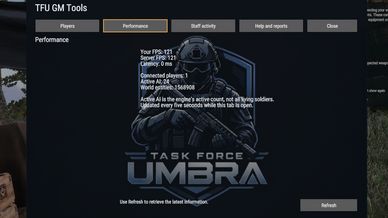
- Your FPS, server FPS and connection latency.

GROUP SIZE
Open Group menu > Group settings > Maximum players.
- Group leaders and staff in that group can choose 1–32 player slots.
- Leaders follow scenario editing restrictions. Staff can resize their own group without leading it.
- Existing defaults, including larger/unlimited groups, stay unchanged until edited.
- Capacity cannot be reduced below current membership. Nobody is removed.

FOR STAFF
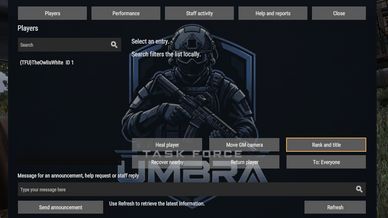
- Search players, heal living or unconscious characters, move the GM camera to them and open their GM properties.
- Recover a living, conscious player on foot to nearby clear space, with a return option.
- Change human players' military ranks using their faction's available ranks.
- Assign Owner, Admin, GM, TFU or custom titles and colors, displayed in chat, the standard player list and supported native nametags.
- Send announcements to everyone, a selected player or that player's faction.
- Display timed announcements and event countdowns.
- Claim, reply to, release, resolve and reopen help requests. Add private staff notes.
- Review staff actions in the panel and server logs.
- View player count, active AI count and loaded world entity count.

The server checks permissions; cosmetic titles grant no access. Action confirmations are private. Camera movement, recovery and player properties require the full GM editor. Healing cannot resurrect dead characters.

AI AND WAYPOINTS
- AI skill: Noob through Elite, plus Prefab default.
- Stance: Automatic, Standing, Crouched or Prone.
- Native formations for AI-only groups.
- Waypoint completion rules and radius from 0–500 metres.
- Fresh GM sessions default to 6.0x time progression, a four-hour real-time day. Adjust it through Scenario properties/Game.

SCORECARD
Sort statistics in either direction. Select a row for details, including separate friendly-player and friendly-AI team kills. K/D supports decimals; with zero deaths, it displays the kill count.

Staff can open player tools from a row and award custom objectives. Recognized native task completions also count. Authenticated reconnects can recover scores within the same scenario.

FRIENDLY NAMETAGS
Staff can enable or disable friendly player/AI tags under Performance > Nametags and adjust normal and optics distances.

Defaults: On, 80 metres normally and 500 through optics. Limits: 1–300 metres normally and up to 1,000 through optics, with optics distance at least normal distance. Native visibility and streaming rules still apply.

Settings: TFU/Nametags.json in the server profile.

CLEANUP
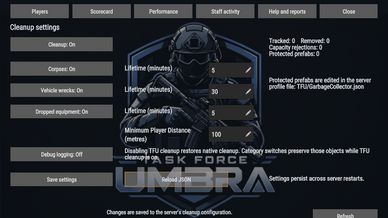
Configure cleanup of corpses, destroyed vehicle wrecks and dropped equipment under Performance > Cleanup settings, or edit TFU/GarbageCollector.json and reload without restarting.

Adjust category switches, lifetimes, Minimum Player Distance and debug logging. Defaults: corpses 5 minutes, wrecks 30 minutes, equipment 5 minutes, player distance 100 metres.

Cleanup protects living/unconscious soldiers, intact vehicles and occupied/repaired wrecks. It waits near players and rechecks objects before removal. Protect additional prefabs through JSON.

Disable TFU cleanup to restore native cleanup or use another cleanup mod. Disabling one category preserves those objects while TFU cleanup is enabled.

Cleanup runs in small batches without world scans or idle polling. Performance readings refresh every five seconds while the tab is open.

COMMANDS
!gmtools / !helpme — Open the panel.
!title list — List player IDs.
!title admin 5 — Assign Admin to player ID 5.
!title custom cyan "Lead Medic" 5 — Custom title/color.
!title clear 5 — Remove a title.
!ann Your message — Announcement.
!ann event 60 Mission starts soon — Countdown.
!ann clear — Clear for everyone.
!ann dismiss — Dismiss locally.
!cleanup status / !cleanup reload

Title management, broadcasts and cleanup commands require staff permissions.

SAVED DATA
Authenticated titles, help conversations, staff notes, cleanup and nametag settings persist using the server profile.

Scorecard statistics reset with the scenario/server. Panel activity, announcements, help claims and recovery positions are session-only. Military ranks follow native scenario/XP rules. Group capacity follows the native group's lifetime and scenario save behavior.
License
Arma Public License (APL)