Summary
Radio without frequencies. Pick Group, Side or Vehicle on the radio wheel and talk to exactly those people, from the moment you join, also while dead or in the deploy map. Beta.
Description
A digital radio. Instead of a frequency, your radio simply says Group, Side or Vehicle, and you talk to the people that name stands for. It works from the moment you join, and it keeps working while you are dead, in the deploy map and after you respawn.

This is a beta. It has been tested with three players at a time and not yet on a full server. Tell .northgate on Discord what breaks and what you would change.

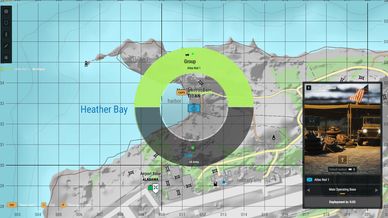
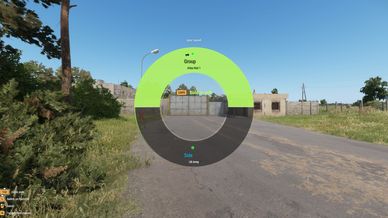
There is nothing to equip and nothing to learn. It uses the game's own radio keys, on a controller too:

- Press G to open the radio wheel and pick a channel.
- Hold Caps Lock to talk on it.
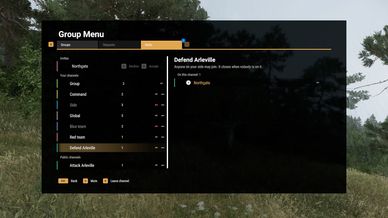
- Press P for the group menu. Its third tab, Radio, lists your channels and who is on each.

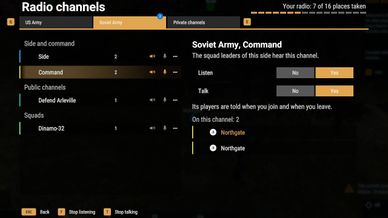
Group reaches your squad. Command reaches the squad leaders of your side, Side everyone on your side, and Vehicle whoever sits in your vehicle. Global is heard by everyone, and only Game Masters and admins talk on it. A squad leader can split his squad into Blue, Red, Yellow and Green teams from the Groups tab, and each team gets a channel of its own.

In the Radio tab you mute a channel, invite a player to a private channel, or open a public channel for your side. A public channel is named for a task and a place, such as Defend Arleville. Anyone on your side may join it, and it closes when nobody is on it. A player you muted in the player list stays silent on the radio as well.

Carry an enemy radio and you hear that side's Side channel, and nothing else of theirs. Your own radio is left as it is, so the game's own radio messages still arrive.

Game Masters get a Radio channels button in the editor's top bar. Its window lists the channels of every side, and a Game Master can listen and talk on any of them. The players on a channel are told when he joins and when he leaves.

The interface is in English for now. Tested on Conflict.

Server owners: the settings are in NCM_Radio/settings.json in the server's profile folder, written with the defaults on the first start. Three switches, all off by default: requireRadio makes a living player need a radio item for every channel but Vehicle and Global, sideLeadersOnly lets only squad leaders talk on Side, and deadListenOnly lets the dead hear and not talk. privateChannels (0 to 3, default 1) is how many private channels one player may be on, and publicChannels (0 to 32, default 8) how many public channels one side may have. 0 switches either off. tunedRadio gives frequencies and tuning back in a second radio menu, on a double tap of G. channels holds up to six channels of your own, each with a name, a colour, its factions and who may talk on it. The mod adds one small entity per player and carries voice over the game's own voice system. With three players talking at once the server held its frame rate. A full server has not been measured yet. It replaces no prefab. It adds entries to seven vanilla files: the two input configs, the menu list, the notification list, the Game Master's scenario properties and the two first-join screens.

Modders: where a radio item matters, any item the game counts as a radio does, vanilla or modded. The mod names no radio prefab. It works through modded classes over the game's voice code (SCR_VONController, SCR_VoNComponent, SCR_VONMenu, SCR_VONRadialDisplay, SCR_VonDisplay), the group menu and the deploy menus. A mod that replaces one of those can conflict with it.

Feedback: .northgate on Discord.

The code is written by AI, under human direction.

Built by the NORTHCOM community. Released under APL-SA.
License
Arma Public License Share Alike (APL-SA)