Summary
Independent vehicle radios with playback queues, library filters, and separate cabin and exterior audio.
Description
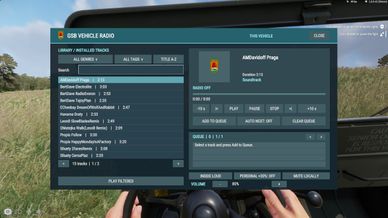
GSB Radio adds a music player to vehicles in Arma Reforger. Each vehicle has its own track, queue, and volume, so different vehicles can play different songs at the same time.

Open GSB Radio from the radial menu while seated in a vehicle or type /gsbradio in chat. Search your library, filter by tags or genres, build a queue, and enable Auto Next to keep it playing. Nearby players can hear the radio from outside the vehicle, and you can mute it locally.

Game Masters can adjust cabin and exterior volume, mute or reset all radios, and enable a personal receiver under Scenario Properties → GSB Settings → GSB Radio.

Requires GSB Core. Install a compatible soundpack to add music to the library.
License
Arma Public License (APL)