Summary
Allows player faction selection with a clean, custom UI. Supports player limits per faction, custom image buttons, and optional FIA, CIV toggling via a simple JSON configuration file.
Description
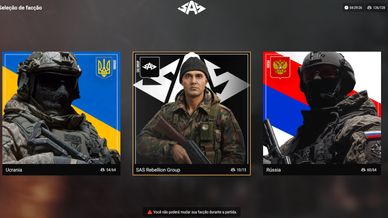
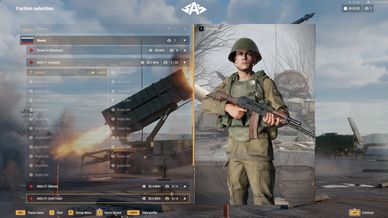
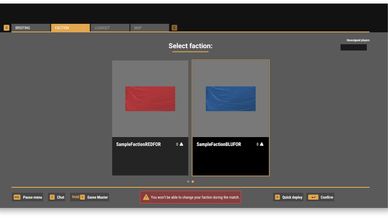
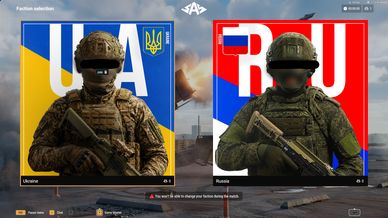
SAS Faction Select replaces the default deploy-menu faction list with a modern, card-based selection screen. It includes team auto-balance, real-time lock states and support for up to 4 factions.

[Updated for Arma Reforger 1.9]
• Layouts rebuilt for the new 1.9 deploy menu structure. The full-screen faction cards are back, with name and player count shown again.
• The loadout preview is wider and fills the right side of the group/loadout screen.
• No server-side changes are needed. Update the mod, and your existing FactionSelectConfig.json keeps working.

[Key Features]
• Modern visual UI: large faction cards with custom artwork that resize with the number of factions (2, 3 or 4), so the screen never overflows.
• Up to 4 playable factions: US, FIA, CIV, USSR, or any custom faction key from your scenario.
• Native playability detection: factions disabled in the mission (limit 0), non-playable factions and Renegade are hidden automatically.
• Deterministic order: US → FIA → CIV → USSR by default, or the exact order you set in the config.
• Built-in auto-balance: stops players from joining a team that would become too large (see below).
• Visual lock states: full or balance-locked factions fade out with a FULL / LOCKED tag and unlock in real time when slots open.
• Respects game mode rules: if faction changes are disabled, players get the permanent-faction warning and a confirmation dialog.

[How To Use]

Add SAS Faction Select to your server mods. It requires SAS_LOG_LIBS (68612267A11B6990).
Start the server once. The config is created automatically at:
$profile:/SAS_Configs/FactionSelectConfig.json
Edit the file, restart the server, and you’re done. The server reads the config and sends it to every client, so players don’t need to configure anything.

Example:

{
  "enableFIA": false,
  "factionKeys": ["US", "USSR"],
  "factionImages": [
    "{CA7B1C35CB7DB7FF}Assets/UI/FactionSelection/faction_us.edds",
    "{AA29340B72C88B54}Assets/UI/FactionSelection/faction_ussr.edds"
  ],
  "enableAutoBalance": true,
  "maxTeamImbalance": 3,
  "balancedFactionKeys": ["US", "USSR"]
}

Parameters:
• “enableFIA”: shows or hides FIA on the selection screen.
• “factionKeys”: the factions shown on screen, in display order. Use the faction keys from your scenario. A faction not in this list is not shown.
• “factionImages”: the card artwork (.edds), in the same order as factionKeys. If an entry is missing, a default image is used.
• “enableAutoBalance”: turns the team balance lock on or off.
• “maxTeamImbalance”: how many more players one team may have than another before it locks (minimum 1).
• “balancedFactionKeys”: which factions are balanced against each other. Factions not in this list (e.g. CIV) are never locked by balance. If the list is empty, all factions are balanced.

[How Auto-Balance Works]
• When a player hovers or clicks a faction, the mod counts that faction’s players plus the player joining. It compares the result with every other balanced faction.
• If the difference goes over maxTeamImbalance, the card shows LOCKED and can’t be selected.
• Example: with maxTeamImbalance 3, US at 20 players and USSR at 17: US + 1 = 21, which is 4 more than USSR, so US locks. Once one more player joins USSR (18), US unlocks.
• A player switching sides is not counted twice: they are removed from their current team for the check.
• The faction player limit is also checked. A faction at its limit shows FULL.
• The faction a player is already in is never locked for them.
• States refresh automatically every second and whenever team sizes change.

[WCS_Core Compatibility]
The mod has no dependency on WCS_Core and works with vanilla Conflict and with WCS_Core servers. On WCS_Core servers we recommend letting SAS Faction Select handle balance on the selection screen and turning off the WCS team balancer, so two balancers don’t conflict. Faction limits from the mission header are applied automatically: a faction with limit 0 is hidden, and a faction at its limit shows FULL.

Example missionHeader setup (the same one we use on SAS servers):

"missionHeader": {
  "m_WCS_Core_Settings": {
    "m_bIsTeamBalancerEnabled": false
  },
  "m_aFactionLimits": [
    { "m_sFactionKey": "US",   "m_iFactionLimit": 64 },
    { "m_sFactionKey": "USSR", "m_iFactionLimit": 64 },
    { "m_sFactionKey": "FIA",  "m_iFactionLimit": 0 }
  ]
}

• m_bIsTeamBalancerEnabled false: turns off WCS balancing. Team balance is then controlled by maxTeamImbalance in FactionSelectConfig.json.
• m_aFactionLimits: a limit of 0 removes the faction from the screen, and any other value is the maximum number of players.
• Keep the other m_WCS_Core_Settings you already use. Only the balancer line matters here.


Developed by @mindisgurpe__ · UX by @matheuskiev
Need help? Contact us on Discord: @mindisgurpe__
License
Arma Public License (APL)