Summary
RADAR AND MISSILE WARNING SYSTEM (RMWS)
By CHATTERBOX 9-8

A helicopter radar and missile warning system for Arma Reforger. It works with missiles and aircraft from any mod. No other mods required.
Description
WHAT IT DOES:

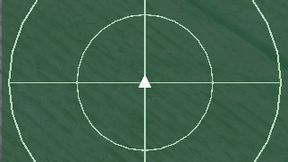
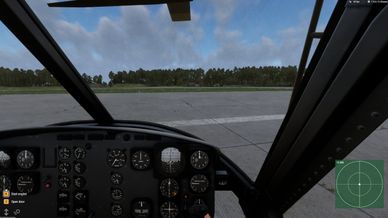
- A small radar on your HUD. Your helicopter is in the centre, heading up, and other aircraft and missiles are shown where they really are.
- Spots guided missiles fired at your helicopter: air-to-air, MANPADS, SAMs and ground-launched.
- Gives voice callouts with a warning tone. The clock position comes first, then the detail.
- Marks where a missile was launched from, on the radar and the map.
- Only works in helicopters. The radar, warnings and sound switch off the moment you get out or move to another vehicle.


VOICE CALLOUTS:

- First missile: "Warning, warning, missile" + tone, then clock position, "Threat", altitude (low / similar / high) and side (front / rear / left / right).
- Every 3 seconds while it's still tracking you: altitude and clock position, plus the total count if there's more than one missile.
- Each extra missile: "Additional missile", altitude, clock position, then the total count.


RADAR SYMBOLS:

Small symbols. The shape shows what it is; the colour shows whose side it's on. Friendly symbols are filled, enemy and INDFOR are outlines.
- Helicopter: circle with a heading tick
- Fixed-wing: arrowhead
- Missile: short streak with a dot. One fired at you flashes and has a line to the centre.
- Launch point: small triangle
- Crash site: small X
- Default colours: friendly blue, enemy red, INDFOR green, hostile missile orange, friendly missile cyan.


WORKS WITH OTHER MODS AUTOMATICALLY:

- Missiles and helicopters from any mod are recognised by how they're built. Nothing needs adding for each mod.
- The server remembers every type it learns, so known types are ready straight away after a restart.
- Admins can force a type either way in MissileTypes.json and AircraftTypes.json, in the server profile's RMWS folder.
- Workbench tool "RMWS: List Guided Missiles and Aircraft" lists everything the addon will recognise in the mods you load.


PLAYER OPTIONS:
(Settings > Interface, rows starting "Radar & MWS:")

- Radar on/off
- Position: top left / top centre / top right / middle left / middle right / bottom left / bottom centre / bottom right (default bottom right)
- Size: small / medium / large
- Zoom: 2 / 5 / 10 / 20 km (default 10 km)
- Background colour
- Icon colours: default, red-green colour blind, blue-yellow colour blind, high-contrast mono
- Warning audio: voice + tone, or tone only
- Voice callout volume: Off to 100% in 10% steps (default 100%). A sample plays when you change it.
- Warning tone volume: Off to 100% in 10% steps (default 100%). A sample plays when you change it.


SERVER OPTIONS:
(pause menu > RADAR & MWS - SERVER SETTINGS, admins and host only; also ServerSettings.json)

- Voice callouts allowed: yes (default) / tone only
- Enemy aircraft on radar: off / only enemies that fired at friendlies / on (default)
- Enemy aircraft range: default 2 km. Friendly aircraft and hostile missiles are always shown.
- Enemy aircraft minimum height: 25-45 m (default 30 m)
- Launch points shown on: radar only / radar + map (default)
- Launch point time on map and radar: default 20 s each
- Passenger seats get radar and warnings: yes (default)
- Warn for unguided rockets too: no (default, guided missiles only)

NOTES:
- All scripts, voice lines and the warning tone are my own work. Bohemia's game classes are extended under the Arma Public Licence and nothing from other mods is included.
- If WCS is loaded, its warning tone is used at 100% tone volume. Below that, the RMWS tone is used.
- Feedback and bug reports welcome. Please include your server log lines starting [RMWS].
License
Arma Public License (APL)