Summary
Personal lockers with private inventories for every player, independent storage at each location, vanilla inventory controls, configurable limits and native checkpoint persistence.
Description
BLACKFOX LOCKERS

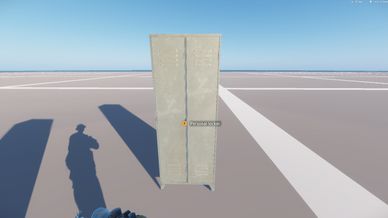
One locker in the world — a separate inventory for every player.

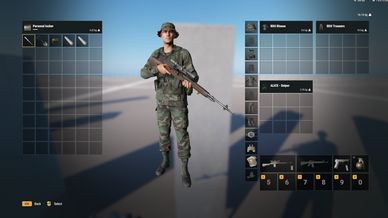
BlackFox Lockers adds personal storage to Arma Reforger. Players interact with the same physical locker while accessing their own inventory.

Each locker location provides independent storage. Items deposited in one locker remain at that location.


FEATURES

- Personal inventories for every player.
- Multiple locker locations with independent storage.
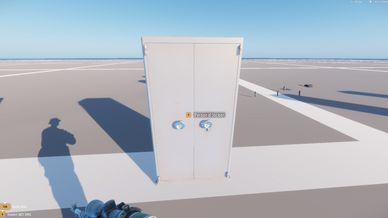
- Three locker variants: a safe, a grey metal cabinet and an olive metal cabinet.
- Vanilla inventory interface with drag-and-drop and quick transfer.
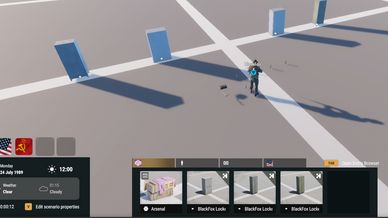
- Game Master placement through the CIV filter.
- Configurable weight, volume and item limits through Game Master properties.
- Automatically generated permanent Locker IDs.
- Support for containers, nested contents, weapon attachments and magazine contents through native persistence.
- Server-side access and capacity checks.
- Native checkpoint integration.
- Included BlackFox Lockers - Showcase scenario.


STORAGE LIMITS

Default capacity for each player's inventory at each locker:

- Maximum weight: 1400 kg.
- Maximum volume: 1500000 inventory volume units.
- Up to 60 top-level items.
- Up to 600 items in total, including containers, nested contents and attachments.

A backpack containing nine items occupies one top-level slot and counts as ten total items.

Weight and volume limits can be adjusted independently for each locker. Top-level and total item limits can be lowered from their maximum values of 60 and 600.

Reducing capacity does not delete items already stored.


GAME MASTER

Find all three variants under the CIV filter by searching for BlackFox Locker.

Place a locker in the world, select it and open Edit Properties. The BlackFox Locker category provides four capacity settings:

- Maximum weight.
- Maximum volume.
- Maximum top-level items.
- Maximum total items, including nested contents and attachments.

Locker identities and capacity settings are retained through native persistence.


PERSISTENCE

Locker inventories participate in the scenario's native checkpoint system.

Loading a checkpoint restores the inventory recorded in that checkpoint. Progress after the latest successful save may be lost following an unexpected shutdown.


SCENARIO INTEGRATION

Install BlackFox Lockers on both the server and clients.

Custom scenarios must integrate the supplied BFL persistence configuration and enable native saving.

Place lockers through Game Master or use the supplied prefabs in Workbench. Configure the capacity of each location as needed.

Empty Locker IDs are assigned automatically on the server. Scenario creators may also assign unique permanent IDs in Workbench. Existing IDs must remain unchanged to preserve access to their associated inventories.


SHOWCASE

BlackFox Lockers - Showcase includes automatic player spawning and four independent lockers: two safes with different capacities, a grey metal cabinet and an olive metal cabinet.

A backpack and magazines are provided for testing. All four lockers can be configured through Game Master properties.
License
Arma Public License (APL)