Summary
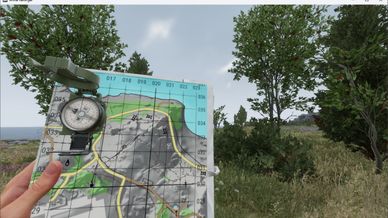
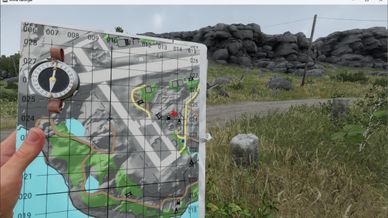
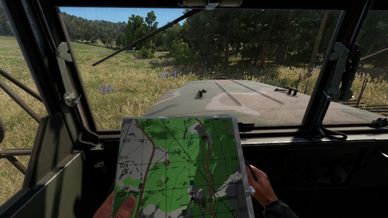
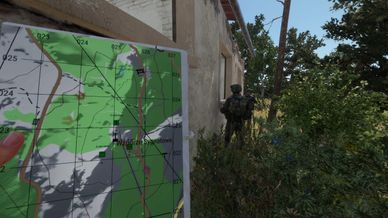
A paper map on a clipboard you hold in your hand – terrain, contours and grid. Optional markers and a compass lying on it.
Description
Handheld Mini Map adds a map you can keep in your hand while walking, driving or flying. It is meant to simulate a real paper map: you see the terrain, contour lines, the grid, roads, buildings and place names.

THE ITEMS
  Handheld Mini Map (US), (USSR) and (FIA) are available in the arsenal of each faction (supply cost 0). They differ only in the compass lying on the map (SY183 for US, Adrianov for USSR and FIA) and in the printed map other players see on it.
  Scenario authors and modders can also use HandheldMiniMap_base.et – the same map without a compass, meant as a template.

USING IT
  - The map is north-up. Rotating it by hand is planned.
  - Zoom in and out with the zoom keys. The map has fixed zoom steps (by default 250, 500, 1000, 2000 and 4000 m across the page).
  - Move the map with the pan keys, up to every edge of the terrain. The map remembers where you left it and at what zoom.
  - The compass needle points to true north, so the angle between the needle and the map's north tells you where you are facing. The vanilla compass key shows or hides the compass while the map is in your hand.
  - Follow mode (if the server enables it): one key toggles between a map that stays where you put it and a map that keeps you in its middle. Panning switches following off.
  - When you walk, the map tilts slightly, giving you a better view. You can also tilt it while standing still with the freelook key.
  - Other players see a printed paper map on your pad – the game can draw only one live map per player, so they cannot see what you see.

CONTROLS (Controls -> Handheld Mini Map)
  Map zoom in
  Map zoom out
  Map pan up / down / left / right
  Map follow player – toggle, works only if follow mode is enabled
  Map rotate left / right (planned)
  Compass show / hide - activated by the vanilla compass key.

SETTINGS (prefab attributes, component HMM_MiniMapGadgetComponent)
  Defaults are those of HandheldMiniMap_base.et; the faction prefabs inherit them.

  Zoom levels - 250, 500, 1000, 2000, 4000 (metres across the page, narrowest first; the zoom keys move one step)
  Start zoom level - 2 (counted from 0, so 1000 m on first use)
  Zoom repeat time - 0.1 s (next step while a zoom key is held)
  Pan pages per second - 0.8
  Follow holder - off (on: players can toggle follow mode; off: pure paper map)
  Show own markers - on (markers you placed on the big map)
  Show shared markers - off (markers of your faction or squad)
  Compass prefab - empty in the base prefab (no compass), set in the faction prefabs
  Compass offset / angles - position and rotation of the compass on the map
  Observer page material - empty in the base prefab (a plain sheet), a vanilla paper map in the faction prefabs (what other players see on your map)

COMPATIBILITY
  Two small modded hooks, both inactive unless this map is in your hand: the compass key (SCR_GadgetManagerComponent.OnGadgetInput) and the Conflict score pop-up (SCR_CampaignInfoDisplay.Show).

* If you have any comments or suggestions, you can find me on the official Arma Discord as @CichyLaslo.
License
Arma Public License Share Alike (APL-SA)