Summary
Makes creating bidirectional base connections in Arma Reforger Workbench faster and easier.
Arma Reforger version 1.7 and 1.8 compatible
Description
PLG Base Connection Tool is a Workbench tool that makes it easier to create bidirectional links between bases in Arma Reforger. It lets you visually connect and disconnect bases directly in WorldEditor, instead of relying on vanilla connection bubbles or tedious manual whitelist setup. This helps you build cleaner and more controlled base networks for custom scenarios, define exactly which bases connect to each other, and work faster with direct visual feedback while editing. It uses vanilla Arma Reforger content and does not require any additional mods to function.

How to use:
1. Open your world in WorldEditor
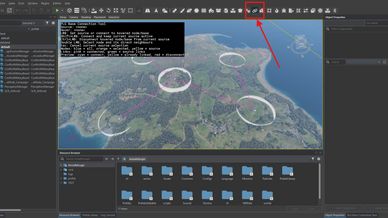
2. In the WorldEditor tool list, choose PLG Base Connection Tool
3. Select the bases you want to work with directly in the viewport

Tool settings:
• Edit Layer: selects which link layer you are currently editing
• Default: used for normal base-to-base connections
• Antenna Built: used for additional or alternate links that become active after a radio antenna is built
• Antenna Behavior (Global Setting): controls how Antenna Built links behave in the scenario
• Add to Default: built antenna links are added on top of the Default links
• Replace Default: built antenna links replace the Default links
• Viewport Info: controls how much on-screen help text is shown while the tool is active

Viewport controls:
• LMB on a base: set the current source base
• LMB on another base: connect the current source and the hovered base
• Shift + LMB: connect while keeping the current source active
• Ctrl + LMB: disconnect the hovered base from the current source
• Double LMB: select the hovered base and its direct neighbours
• Esc: cancel the current source selection

Hierarchy actions:
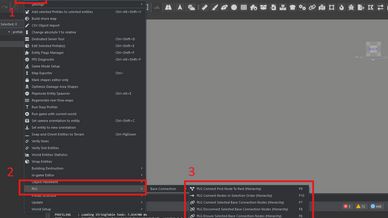
• Open Plugins > PLG/Base Connection
• These actions work on the current Hierarchy selection

Available actions:
• Ensure Selected Base Connection Nodes: prepares selected bases for the system and creates missing node data if needed
• Connect Selected Base Connection Nodes: connects the selected bases directly
• Disconnect Selected Base Connection Nodes: removes direct links between all selected bases
• Connect First Node To Rest: connects the first selected base to every other selected base
• Connect Nodes In Selection Order: connects selected bases in order, for example A-B-C-D
• Validate Base Connection: checks for invalid GUIDs, missing links, duplicate data, self-links, and other common graph issues

Visual guide:
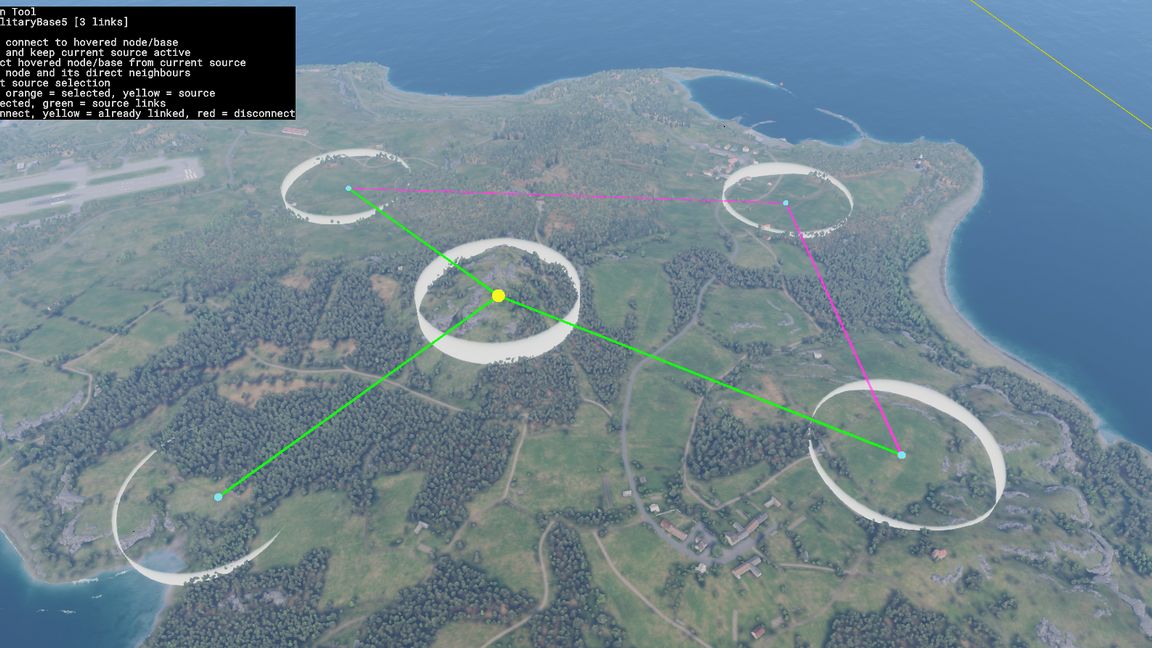
• Blue: all available nodes
• Orange: selected nodes
• Yellow: current source node
• Pink: authored links in the currently visible graph
• Green: links from the current source node
• Cyan: connect preview
• Yellow preview: link already exists
• Red preview: disconnect preview

How connections work:
• All connections created by the tool are bidirectional
• If Base A is connected to Base B, then Base B is also connected to Base A
• Bases only connect where you explicitly create links
• The Default layer is used for normal base connections
• The Antenna Built layer can be used for extra or alternate links after a radio antenna is built
• Antenna Behavior is a global scenario setting that decides whether Antenna Built links are added to the Default layer or replace it
• Bases prepared for this system use the authored Base Connection graph instead of relying on vanilla automatic radio bubble behavior
License
LICENSE AGREEMENT

All rights reserved. This mod and all of its contents remain the property of the author.

PERMITTED USE:
- Personal and commercial use in Arma Reforger gameplay
- Monetization of servers utilizing this mod is explicitly permitted
- Use of this mod on private, hosted, dedicated, or public servers
- Other mods, missions, or scenarios may require this mod as a dependency, as long as this mod is not reuploaded, copied, or redistributed as part of another project

PROHIBITED WITHOUT WRITTEN PERMISSION:
- Editing, modifying, or altering this mod's original files for redistribution
- Copying or extracting this mod's code or assets for use in other projects
- Reuploading or redistributing this mod, in whole or in part
- Claiming this mod or any of its contents as your own work

DISCLAIMER:
This mod is provided "as is" without any warranties. The author is not responsible for any damage, issues, or problems caused by the use of this mod.

The author reserves the right to update or remove this mod at any time. Violation of these terms results in immediate termination of usage rights.

© All Rights Reserved