Summary
A toolset for Arma Reforger Workbench designed to streamline your screenshot workflows. Currently featuring the Bone Manipulator for fast, direct skeleton posing through custom viewport interaction.
Description
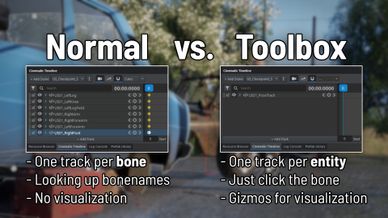
Screenshot Toolbox is a Workbench toolset for Arma Reforger focused on improving screenshot workflows. It currently includes the Bone Manipulator, a tool designed to remove the friction of the default animation workflow by providing a fast, visual, and self-contained posing solution within the Workbench viewport.

CONSOLE SUPPORT:
This is a tool for the workbench of the game. So it is PC only, though there are plans for a similar mod that works on all platforms in the future.

MORE INFORMATION & DOCUMENTATION:
Full documentation, explanation video, installation instructions, and the source code are available on GitHub:
https://github.com/Hexomanya/screenshot-toolbox/

KEY FEATURES:
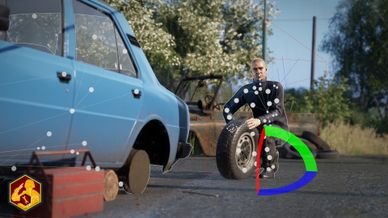
- Direct bone selection via viewport overlays
- Custom-built gizmos for Position, Rotation, and Scale
- Real-time pose manipulation
- Support for entities in slots (doors, turrets, rotors) with infinite nesting
- Keybind customization directly inside the tool
- Workspace filtering options for improved clarity
- Compatible with most entities that contain a skeleton

HOTKEYS:
U - Rotation gizmo
I - Position gizmo
O - Scale gizmo
J - Reset selected bone
ESC - Exit bone edit mode

Hotkeys use non-standard keys due to Workbench input binding limitations. They can be changed inside the tool, restricted to keys unused by the Workbench.

PLANNED FEATURES:
- Basic IK support (hands and feet)
- Pose or animation frame inversion
- Toggle between world and local transform modes

KNOWN ISSUES:
- Applying multiple layered pose modifications on the same bone is currently not supported
- Certain settings (such as filters) only update when the mouse re-enters the viewport, due to API limitations
- The move gizmo can break when used on a bone in a chain that already has transforms applied

SUPPORT:
Need help or want to report a bug?
- Find the Screenshot Toolbox thread in the #enf_showcase channel on the official Arma Discord.
- Alternatively, open an issue directly on the GitHub repository.

DEVELOPMENT NOTES:
This project was created manually. AI tools were used strictly for bug identification, formatting, documentation, and gizmo shape generation.
License
MIT License

Copyright (c) 2026 Hexomanya

Permission is hereby granted, free of charge, to any person obtaining a copy
of this software and associated documentation files (the "Software"), to deal
in the Software without restriction, including without limitation the rights
to use, copy, modify, merge, publish, distribute, sublicense, and/or sell
copies of the Software, and to permit persons to whom the Software is
furnished to do so, subject to the following conditions:

The above copyright notice and this permission notice shall be included in all
copies or substantial portions of the Software.

THE SOFTWARE IS PROVIDED "AS IS", WITHOUT WARRANTY OF ANY KIND, EXPRESS OR
IMPLIED, INCLUDING BUT NOT LIMITED TO THE WARRANTIES OF MERCHANTABILITY,
FITNESS FOR A PARTICULAR PURPOSE AND NONINFRINGEMENT. IN NO EVENT SHALL THE
AUTHORS OR COPYRIGHT HOLDERS BE LIABLE FOR ANY CLAIM, DAMAGES OR OTHER
LIABILITY, WHETHER IN AN ACTION OF CONTRACT, TORT OR OTHERWISE, ARISING FROM,
OUT OF OR IN CONNECTION WITH THE SOFTWARE OR THE USE OR OTHER DEALINGS IN THE
SOFTWARE.