Summary
Enhanced radio: ear routing, EWar jamming, manual frequency, GRS/ACE beeps, per-channel volume, and alternate channel PTT. NEW: Radio propagation simulation.
Description
SPECIAL THANKS AND BIG CREDIT TO:
GRS: Sound files
ACE (and ACRE2): Sound files

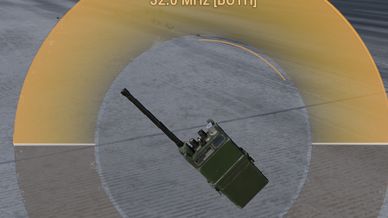
To use this simply open up the radio radial menu, and you'll immediately see which routing each channel is configured to.  You can adjust the keybinds in the settings :)

To cycle routing:
Press T (keyboard) or the RIGHT SHOULDER (gamepad) over the selected channel to cycle between the following:

CENTER
RIGHT
LEFT

To set radio frequency manually:
While having the radial menu opened, press the F key or left bumper on your gamepad on the highlighted channel. Follow the prompt.

To change beep type, press K on your keyboard or Y on your gamepad while highlighting the appropriate channel in the radial menu.

/radiochecks [on/off] --typing this command into the chat will turn on/off the radio init test at the beginning of the game session
/radiobeeps [on/off] --typing this command into the chat will turn on/off the beeps/squelch when other players transmit to you
these settings will persist across game sessions :)

To change volume per channel use CTRL + Mousewheel, no bind set for console, but can be configured in settings.

To designate alternate channel in radial menu, CTRL-F on highlighted channel, Y to transmit on alternate channel ( (right and left shoulder on console). You can configure these keybindings.

The radio propagation feature is experimental and is disabled by default. You may enable this by going to the profile folder that your server uses, and look for IRRU_RFPropagation.json (the mod will create this if its run for the first time). Inside that json file, set RFPropagationEnabled to true instead of false.

WARNING: The routing may not work as intended when receiving multiple transmission, this is known limitation with the Enfusion engine, as it does not generate a new instance of audio stream for any given stream of communication.

LIKELY NOT COMPATIBLE WITH ANY MODS THAT MODIFY VON COMPONENTS

Developed by Fedora12 for the 506th IRRU

Feedback is always welcome! Do not hesitate to reach me in Arma Reforger discord server

ADDITIONAL CREDITS:

> Sound effects from http://www.freesfx.co.uk
> Roger beep derived from "Walkie Talkie.wav" by CGEffex
> (https://freesound.org/people/CGEffex/sounds/97797/), licensed under CC BY 4.0
> (https://creativecommons.org/licenses/by/4.0/) — clipped and volume-adjusted.
> Error tone via freesound.org, CC0 1.0 (public domain).
License
Arma Public License Share Alike (APL-SA)