Summary
ATAK, +Chat +Feed(Livestreams) +GPS
Description
🚀 Early Update Release – Open Alpha Phase V1.0.8 I’ve made significant progress and decided to push this update live earlier than planned (original ETA: Feb 14/15).

This build is now entering Open Alpha. This means: the core features work, but bugs are part of the experience. The goal right now is testing, feedback, and rapid iteration.

🔧 What’s New

    New Keybind Menu: Now supports vanilla re-binding.

    Improved Tablet Brightness: New adjustment method for better visibility.

    Updated UI: New elements and interface modes.

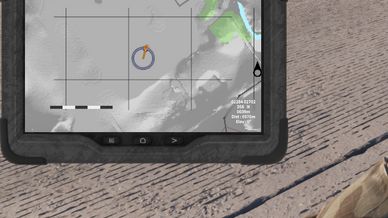
    Map Markers: Visuals for your own position and the current cursor/pan location.

    Functional GPS: The core GPS system is now live.

    Debug Mode: Added for faster testing via Workbench.

    Arsenal Integration: Item is now available in the Arsenal.

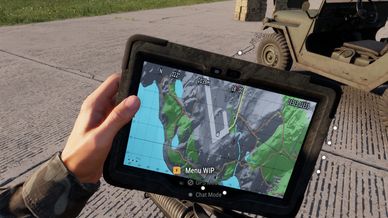
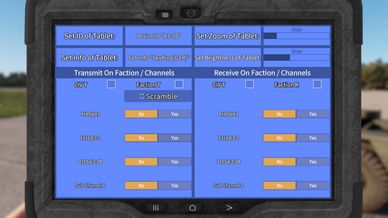
🧭 Tablet Flow (Current State) Once the tablet is in your inventory, you can power it up and choose between three UI modes:

    In-hand mode

    Large Mode (~85% screen)

    Mini Mode (~40% screen) (Note: Currently, only the GPS mode is fully active.)

🎮 Temporary Keybinds (Testing Only)

    Ctrl + F1 → Power On / Start / Off / Reset

    Ctrl + 1 → GPS (Modes 2-4: Chat, Settings, Feed are TODO)

    Ctrl + F2 → Center map on player

    Ctrl + F3 → Center & Lock camera to player

    Page Up / Down → Zoom In / Out

    Ctrl + Page Up / Down → Adjust Brightness

    Ctrl + Arrow Keys → Pan map

    LShift + Q → Mini Mode

    LShift + E → Big Mode

🐛 Open Alpha = Feedback Needed Bugs are expected! Please report anything unusual and feel free to suggest improvements. Keybinds are a major focus: The current layout is for testing and will likely change—your input here is extremely valuable.

Thanks for testing and helping me push this project forward! More features coming soon.
License
Arma Public License No Derivatives (APL-ND)