Summary
BTGG system to dynamically change materials on a prefab depending on who controls a given military base in conflict.
Description
This mod will monitor a specific capture point and change the emat of the prefab the component is on based on which faction has control of the capture point.

How to Use
-----
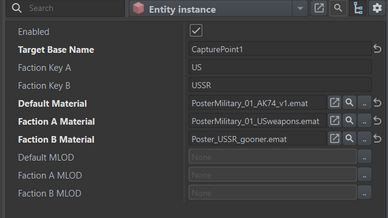
Add the Component: Open your prefab (or entity in the World Editor) that you want to change visually (e.g., a flag, a billboard, or a sign). Add the BTGG_DynamicFactionMaterialManager component to it.

Link the Base: Find the base you want to monitor in your Hierarchy (Left Pane). Copy the Entity Name of that object (the one containing the SCR_MilitaryBaseComponent). Paste it into the Target Base Name field.

Faction Keys: Enter the faction keys you are using (e.g., US, USSR, FIA, RHS_US).

Materials: Select the .emat material files you want to apply for each faction.

Default Material: This is used when the base is neutral or held by a faction you haven't defined.

Note: MLOD fields are optional. Leave them empty if your mesh doesn't require specific lower-detail material swaps.
License
Arma Public License (APL)