Summary
The Aviation Toolkit for Arma Reforger bridges **JSBSim** into Enfusion, giving modders a pro-grade framework to implement authentic, data-driven flight physics with ease. Realism made simple.
Description
Aviation Toolkit for Arma Reforger (EXPERIMENTAL!!!!!)
Powered by JSBSim Flight Dynamics

Overview:
The Aviation Toolkit is a comprehensive development framework designed to bring professional-grade flight physics to Arma Reforger. By  integrating the industry-standard JSBSim—an open-source Flight Dynamics Model (FDM) used in professional flight simulators—this toolkit provides the most authentic fixed-wing experience ever seen in the Enfusion engine.

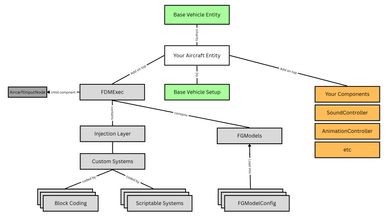
The toolkit also comes with a injection layer to help you hook your scripts into flight controll system calls to create complex systems. you can do it in the following ways:
-Nested coding blocks (mimics JSB Sim style xml)
-Enforce Script by inheriting from the base class that gets injected into the layer

Flight Controls:
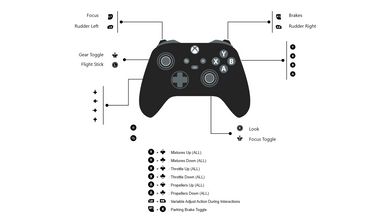
Almost all flight controls can be controlled through the aircrafts by the choice of their creators, but keybindings do exists for ease of use, Bindings were kept close to FSX and X-Plane controls so anyone who wishes to play can seamlessly jump in without needing to relearn core aircraft handling inputs.

KeyBindings [Not Configurable ATM]

[ENGINES CONTROLS]
ThrottleControl: **F2 / F3**
PropellerControl: **F4 / F5**
MixtureControl: **F6 / F7**

[CONTROL SURFACES & GEAR]
FlapsDown: **F**
FlapsUp: **Shift + F**
GearControll: **Shift + G**
ElevatorControl: **W / S**
AileronControl: **A / D**
Rudder&Steering: **Q / E**

[BRAKE SYSTEMS]
LeftToeBrake: **Numpad 4**
RightToeBrake: **Numpad 6**
Brakes: **Spacebar**
ParkingBrakesToggle: **Period(.)**

[IGNITION & STARTUP]
Engine1MagnetoUp: **Shift + M**
Engine2MagnetoUp: **Shift + M**
Engine3MagnetoUp: **Shift + M**
Engine4MagnetoUp: **Shift + M**
Engine1MagnetoDown: **Ctrl + M**
Engine3MagnetoDown: **Ctrl + M**
Engine4MagnetoDown: **Ctrl + M**
Engine2MagnetoDown: **Ctrl + M**

Engine1Starter: **Shift + Ctrl + S**
Engine2Starter: **Shift + Ctrl + S**
Engine3Starter: **Shift + Ctrl + S**
Engine4Starter: **Shift + Ctrl + S**

Garmin GPS Toggle: **Crtl + G**
License
Arma Public License No Derivatives (APL-ND)