Summary
DOOM-style arcade FPS inside Arma Reforger. Use the in-world cabinet, play, shoot, edit maps and test builds. Please read the README before using or reporting issues.
Description
# DOOMTEST

https://github.com/josharghhh/ARMA_RETROFORGER

DOOMTEST is DOOM-style arcade madness running inside Arma Reforger.


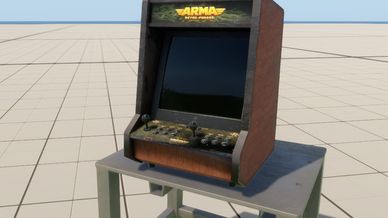
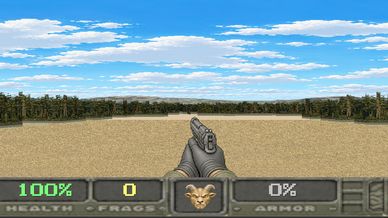
You walk up to an arcade cabinet in-world, press use, and it opens a playable first-person shooter. It is not a video texture. It is not an emulator window. It is a software raycaster drawn into a Reforger `CanvasWidget`, with Reforger UI, audio, post-process, and input doing the work around it.


It started because I made an arcade monitor prop and HorribleGoat asked the only question that mattered:


Can it play DOOM?


Yes. Somehow.


## What Is In Here


- GM placeable arcade: `PrefabsEditable/DOOM/E_ARGH_Arcade.et`


## How To Play


Open the addon in Workbench, load one of the test worlds, and press Play.


Walk up to the arcade machine and press your normal Reforger use key, usually `F`. The launcher opens. Click `PLAY`.


If you want to put the arcade in another world by hand, drop `Prefabs/DOOM/DoomArcadeMonitor.et` into the scene. Also place one `Prefabs/PostFX/DOOM_PixelFXActivator.et` somewhere in the world if you want the pixelated CRT look.


In Game Master, open the Entity Browser and search for `ARGH ARCADE`. The placeable GM item is `PrefabsEditable/DOOM/E_ARGH_Arcade.et`. It places the arcade cabinet on its table as one editable object. This is an object/editor item, not a faction entry.


## Controls


Menu:


- `Mouse`: click `PLAY`, `QUIT`, or `CREDITS`
- `Backspace` / menu back: leave the game and return to the launcher
- `Backspace` / menu back from launcher: close the arcade and return to Reforger
- `CREDITS`: opens the cracktro/outro credits


Gameplay:


- `W` / `Up`: move forward
- `S` / `Down`: move backward
- `A` / `Left`: strafe left
- `D` / `Right`: strafe right
- `Mouse`: turn
- `Left Mouse`: fire
- `Right Mouse`: toggle aim down sights
- `E`: use doors
- `1`: M9
- `2`: shotgun
- `3`: AK after pickup
- `4`: M4 after pickup


Cheat console:


- `` ` `` / `F2` / `Insert`: open or close the console
- `Enter`: run the command
- `Esc`: cancel and close
- `god_mode=1`, `god_mode=on`, `godmode=1`: invincible
- `god_mode=0`, `god_mode=off`, `godmode=0`: mortal again


While the console is open, gameplay input is blocked so typing does not move the player around.


## Tile Editor


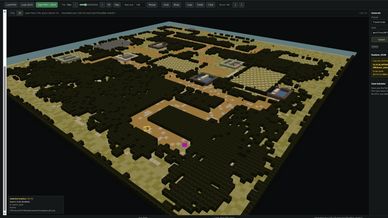
The tile editor is a local HTML tool:


`Docs/tile_plan_editor.html`


Open it in browser


Basic flow:


1. `Load PNG` or `Load JSON`
2. Pick a floor, wall, fence, or marker from the left panel
3. Paint the map in `Plan`
4. Check it in `3D`
5. `Save PNG + JSON`
6. Put your custom map JSON at `$profile:DOOM/doom_island_tile_plan.json`


Plan view:


- `Left Mouse`: paint
- `Left Mouse Drag`: paint a stroke
- `Alt + Left Mouse Drag`: box select
- `Right Mouse`: context menu
- `Delete` / `Backspace`: delete selected thing or clear selected area
- `Esc`: clear selection / close context menu
- `[` / `]`: brush size down/up
- `Ctrl+Z`: undo
- `Ctrl+Y` / `Ctrl+Shift+Z`: redo
- `Ctrl+C`: copy
- `Ctrl+V`: paste
- `H`: hover helper


3D view:


- `Left Mouse`: select object
- `Shift + Left Mouse`: paint the active tile onto the clicked object
- `Right Mouse Drag` / `Middle Mouse Drag`: orbit
- `Shift + Right Mouse Drag` / `Shift + Middle Mouse Drag`: pan
- `Mouse Wheel`: zoom
- `Right Mouse + Mouse Wheel`: change 3D move speed
- `Double Click`: focus camera on object
- `WASD`: move camera target
- `Q`: move camera target up
- `Z`: move camera target down


Generator:


- `New`: new random island
- `Regen`: rerun current seed
- `Variant -` / `Variant +`: try another version of the same seed
- `Ctrl+G`: new seed


Runtime map load order:


1. `$profile:DOOM/doom_island_tile_plan.json`
2. `$profile:/DOOM/doom_island_tile_plan.json`
3. fresh random `128x128` island


If there is no profile map, the arcade generates a new `128x128` island each time.


## Credits


joshargh


## Attribution / License Notes


DOOMTEST is a fan project. It is not official, not commercial, and not endorsed by id Software, Bethesda, ZeniMax, Bohemia Interactive, or the Freedoom project.


DOOM, id Software, Bethesda, ZeniMax, Arma, Reforger, and related names/trademarks belong to their owners.


The gameplay/menu code in this addon is original Enforce script written for Reforger. The `DOOM/linuxdoom-1.10/` folder, if shipped, is the historical 1997 Linux DOOM source release kept as reference material only. It includes its original GPL v2 license files. DOOMTEST does not compile, link, import, or port that source into the addon scripts.


Some visual assets under `UI/Textures/DOOM/freedoom/` are exported from Freedoom 0.13.0 / `freedoom2.wad`.


- Freedoom project: https://freedoom.github.io/
- Freedoom 0.13.0: https://github.com/freedoom/freedoom/releases/tag/v0.13.0
- Freedoom license: BSD-3-Clause / modified BSD
- Freedoom copyright: Copyright 2001-2024 Contributors to the Freedoom project


Keep Freedoom attribution and license notes with redistributed builds.
License
Arma Public License (APL)