Summary
Command your AI from a tactical map and an order wheel: groups, orders, vehicles, engineers, contacts. Any faction, any scenario, dedicated servers, 13 languages.
Description
# Battlegroup Command


**Command your AI.** Build, reorganise and command a large number of friendly AI from a dedicated tactical page and an in-game order wheel: groups, orders, vehicles, engineers, contacts and a faction commander.


Made for multiplayer on dedicated servers. Works with any scenario and any faction. No dependency other than the base game. Available in 13 languages (follows each player's game language).


## Features


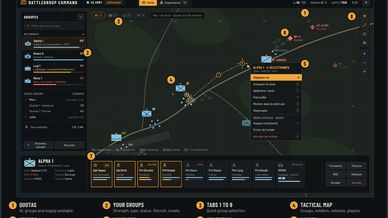
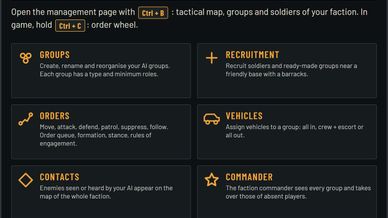
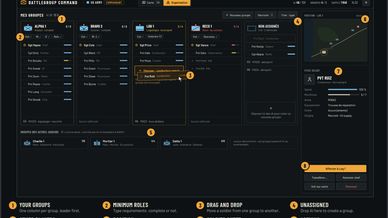
**Management page (Ctrl + B)**
- Map view: tactical map with NATO symbols for your groups, soldiers, vehicles and the players of your faction, plus the scenario bases and game map markers.
- Organisation view (TAB): one column per group, drag and drop soldiers, soldier sheet, mini-map.


**In game**
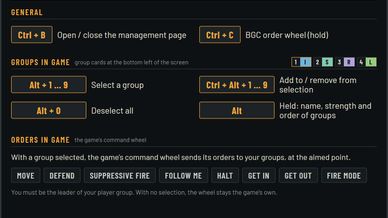
- Group cards at the bottom left: select groups with Alt + 1 to 9.
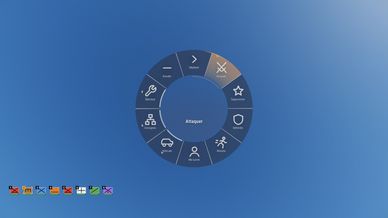
- Order wheel (hold Ctrl + C): order the selected groups at the point you look at. With no group selected, facing an AI: join, leave or change group.


**Groups**
- Create, rename, dissolve, split into two sub-groups, transfer to a player or hand over to faction command.
- Eleven group types with minimum roles, detected from each soldier's equipment.


**Recruitment**
- Soldiers or ready-made groups from the faction's own catalogue.
- Paid with supplies near a friendly base with a barracks, or free (server setting). Quotas per player, faction and commander.


**Orders**
- Move, attack, defend, patrol, suppressive fire, retreat, follow, board / dismount.
- Order queue, formation, stance and rules of engagement.
- Individual orders for selected soldiers. Regroup brings them back.
- Special orders: engineers repair vehicles and build blueprints, transport and logistics groups load and unload supply.


**Vehicles**
- Up to 4 vehicles per group, each in its own mode: all in, crew + escort, or all out.
- Other groups can ride along as passengers.
- Helicopters: AI ride as passengers and gunners, a player flies.


**Contacts and status**
- Enemies seen or heard by your AI appear on the map of the whole faction.
- Live group status and ammunition. Soldiers near a friendly arsenal resupply on their own.


**Faction commander and persistence**
- The commander sees every group of the faction and can rename, reassign or requisition them.
- Groups of a player who leaves stay reserved for them, then become available to the faction. They are given back when the player returns.
- Groups are kept across a server restart.


**Also**
- Distant AI managed by BGC keep moving and fighting far from any player.
- Briefing sign prefabs (English and French) for mission makers: `Prefabs/BGC/Briefing/`.


## Install


Workshop: https://reforger.armaplatform.com/workshop/32C5A359B406A788-BGC_Core-BattlegroupCommand


- Players: nothing to do, the mod is downloaded when joining a server that uses it.
- Servers: add `{ "modId": "32C5A359B406A788", "name": "BGC_Core - Battlegroup Command" }` to `mods` in the server config.
- Mission and mod makers: add `32C5A359B406A788` to the dependencies of your project. BGC starts by itself.


## Default keys


All keys can be rebound in Settings > Controls, category "Battlegroup Command".


- Ctrl + B: management page
- Ctrl + C (hold): order wheel
- Alt + 1 to 9 / Alt + 0: select / deselect in-game groups (Ctrl to add)
- TAB: Map view / Organisation view
- Right click: order menu (then D A T F E S V R X)
- Shift: order queue, add to selection, selection rectangle


## Server settings


Created on first start in the server profile: `$profile:BGC_Core/config.json` (quotas, recruitment, commander, vehicles, orders, logs) and `group_types.json` (group types and minimum roles).


## Compatibility


- Base game only, any faction: nothing is hard-coded.
- Built to coexist with other mods: everything is prefixed `BGC_`, no vanilla file is replaced.
- Server and clients must run the same version.


## Known limitations


- Not yet tested with modded factions.
- Helicopters are not flown by AI. BGC does not spawn vehicles.
- After rebinding a key, the page and the briefing signs still show the default keys.


## Planned


More special orders (mortar, medical, recon), vehicle purchase and convoys, AI-flown helicopters, optional companion mods.
License
Arma Public License (APL)