


This is part 2 of the Arma Reforger 1.9 Modding Update, focusing on smaller improvements, fixes, and additions worth highlighting for modders.
While the previous article covered the major changes to wheeled vehicles, magazine repacking, hydration, AI spawning, loitering, and inventory systems, this article takes a closer look at updates to audio, animation, the Workbench editors, rendering, UI layouts, and scripting.
Audio and Dialogue
New Dialogue Callbacks
The DialogueData class now includes two additional callbacks that were previously available in per-node data already:
OnInterrupt(IEntity pSpeaker)OnSkip(IEntity pSpeaker)
These callbacks allow dialogue interruption and skipping behavior to be handled directly through DialogueData.
Placeholder Audio Files
The Dialogue system now supports placeholder audio files when final voice-over recordings are not yet available.
If the expected recording cannot be found, the system automatically looks for a corresponding placeholder file instead.
How to use placeholders:
Create a temporary sound file using the naming convention
placeholder_<name>.snd, where<name>matches the exact filename expected by the dialogue lookup.Place the placeholder in the appropriate audio folder.
When the final recording is ready, place the finished
.sndfile in the same folder.
The system always prioritizes the final recording over its placeholder. Once the finished file is available, it will be used automatically without requiring changes to the dialogue setup.
Editor Changes
Animation Editor
Time Save and Time Use nodes can now share named animation times across an entity hierarchy.
This makes it possible to synchronize animation timing between related entities, such as a character riding a horse.
Enabling Shared Time Storage
The feature is disabled by default.
To enable it:
Select the relevant Time Save / Time Use node.
Enable the Root Entity Storage option.
Assign a storage name that will be shared between the relevant animation graphs.
When enabled, the time is stored in shared storage associated with the topmost parent entity.
Any Time Save or Time Use node within the same entity hierarchy can access the stored time by referencing the same storage name.
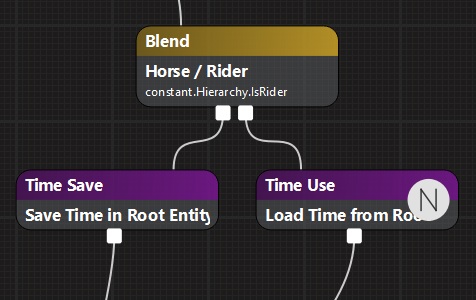
Important Considerations
Shared hierarchy required: Both entities must belong to the same hierarchy under the same root entity. Separate entities placed near one another in the world cannot share times.
Unique storage names: Storage names are shared across the entire hierarchy. Use distinct names when different animation graphs require independent timing.
Time formats: Time Use can read back either real time or normalized time.
Replay support: Shared animation times are saved in animation replays.
Evaluation order: The graph saving the time must be evaluated before the graph attempting to read it.
World Editor: Road Mask and Satellite Map Export
The World Editor now provides additional export options for terrain-related imagery.
Location: World Editor > Terrain Tool > Satellite Map
Two export options are available:
Road Mask: Exports a PNG with configurable tile texture size, color or grayscale output, and MSAA settings.
Satellite Map: Exports the existing satellite map as a full-color PNG at its original resolution.
Note: The road mask data is stored in the exported image's alpha channel.
World Editor: Config Cloning and Reassignment
Config objects can now be cloned and reassigned through scripts, providing more flexibility when working with components and object properties.
Two APIs are relevant:
BaseContainerTools.CloneContainer(container)
Creates a clone of an existing config container and returns a resource holder.
The cloned config can be accessed using:
GetResource().ToBaseContainer()
WorldEditorAPI.SetObjectVariableMember()
Allows an existing container to be assigned to an object property within Workbench.
Together, these capabilities allow scripts to clone a component's configuration and attach it elsewhere.
Property Grid
Copying and Pasting Complex Properties
Copying and pasting properties in the Properties tab has been fixed for more complex attribute types.
Previously, copying was unreliable or unsupported for attributes that were not simple data types.
This included:
Font properties on a
TextWidget.Entire components or config objects.
For example, it is now possible to copy a component and paste it into another prefab.
Improved Inherited Config Visualization
Inherited config files are now represented more clearly in child configs and prefabs.
When a config object inherits from another config file, the inherited object is now displayed in gray within the child config.
This makes inherited configuration relationships easier to identify.
Rendering and Materials
Font Fallback
Dynamic bitmap fonts now support automatic fallback to runtime TrueType rasterization when a requested glyph is missing.
Previously, unsupported characters could fail to display entirely.
With this improvement, the fallback system can render UI text containing characters outside a bitmap font's supported character set.
This is particularly beneficial for languages using larger character sets, including:
Chinese
Japanese
Korean
If your mod uses a custom bitmap font with a limited character set, check how fallback characters appear alongside the original font.
User Interface
UI Scaling and Layout Adjustments
Several vanilla menu layouts have been re-anchored to better support the UI Scale option found under Settings > Interface.
The following layouts have been updated:
Main Menus: MainMenu.layout, pauseMenu.layout, WelcomeScreenMenu.layout
Welcome Screen: Associated WelcomeScreen* sub-layouts
Multiplayer: RoleSelectionMenu.layout, GroupMenu.layout, PlayerListMenu.layout, PlayerListEntry.layout, ServerBrowserMenu.layout
Inventory & HUD: InventoryMain.layout, HUDManager_Root.layout, MortarInfo.layout
Gameplay & Settings: Mode_CampaignBuilding.layout, InterfaceSettings.layout
Mod Compatibility Considerations
These changes may affect mods that override vanilla layouts or add widgets to existing menu structures.
If your mod modifies any of the affected layouts:
Review the updated vanilla layout.
Re-inherit from the vanilla layout where necessary.
Adjust custom widget positions and anchors to account for the changes.
Verify that the modified interface behaves correctly across different UI scale settings.
Miscellaneous Scripting Changes
World.TraceMove Improvements
World.TraceMove now supports an alternative interpretation of the End field in TraceParam.
The field can represent a displacement from the starting position, calculated as:
start + direction
This approach provides improved numerical stability for long traces performed far from the origin.
Summary
While these updates are smaller in scope, they introduce several useful improvements. For the larger gameplay and systems changes introduced in version 1.9, refer to our previous Modding Update Changes and Improvements in 1.9.