

Changes and Improvements for Audio in 1.6
A general note on broken sound and using vanilla Signals
One of the most common sources of issues for mods have been changes in vanilla Signal (.sig) files, such as removed output ports. We therefore recommend to create and use duplicates of vanilla Signals in your mod. This way, changes in vanilla Signals won't break your sounds. Please note: Do not use the "override" functionality. This would mod the Signals and be likely to cause issues with other mods.
Changes in the Workbench Audio Editor
Notable Bugfixes
Reordering Signal output ports no longer causes the output of wrong values
The inner range of the Amplitude node can no longer exceed the outer range.
Fixed: Amplitude directivity no longer stops working after 100m.
Fixed an issue where the Generator "Silence" was not counting towards the total playtime of a sound.
Fixed faulty sound playback when using a very short attack time in combination with silence on banks.
Mixer ports don't require an additional context-menu step to be activated and deactivated.
It is now possible to connect the same port to the same Signal port in multiple Acps via "Acp in Acp" without getting an error.
The ResourceBrowser now correctly recalls its state between sessions.
Signals are no longer shown multiple times when using Acp nodes containing the same Signals as the parent.
Snd files and Opus (Ogg)
Enfusion got support for the Opus audio format. Opus is a lossy format which trades lower quality with a significantly decreased file size and slightly increased decoding time. It is therefore primarily recommended for music tracks.
Please note that you can NOT just drop an Ogg file into your project. Instead, Enfusion now offers the option to convert your Wav files into Snd (Sound) files. Snd is a new container format which supports both Wav and Ogg.
How to convert Wav files to Ogg:
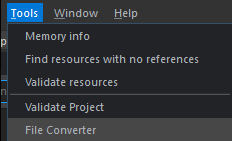
In the Audio Editor, click on Tools -> File Converter.
Drag & Drop the Wav files you want to convert into the conversion panel,
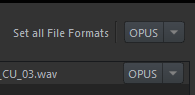
Select OPUS as the file format and click Convert. This will create Snd (not Ogg!) files with the same names in the same folders as the original files.
Replace the Wav files with the Snd files in your banks!
When building/publishing the Addon, the original Wav file will be excluded and only the Snd file will be built. (Which is why it's important to make sure you replace all original Wav files in your banks.)
Local Variables
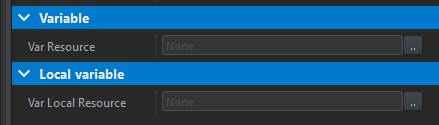
Local Variables function the same way as Global Audio Variables, but are tied to an instance of a sound. For example: Two weapons could use the same Local Variable of Source Type "Volume", and each weapon (or better, their SoundComponents) would return a different value.
They
use a separate "Local variable" item category in the Variable node
should be set up in a different config file than Global Variables
can not be set or get via script
are not available in Signals (.sig) files
Changes in GameCode and Data
Removal of some global Signals
The following global Signals were removed completely:
GInterior
GRoomSize
GIsThirdPersonCam
GCurrVehicleCoverage
They were replaced with Global Audio Variables with identical names.
SCR_SoundManagerEntity is now SCR_SoundManagerModule
SCR_SoundManagerEntity was made into a module and renamed to SCR_SoundManagerModule. Its functionality should remain identical, meaning renaming instances in scripts should suffice.
"Grass" Signal in AmbientSoundsComponent
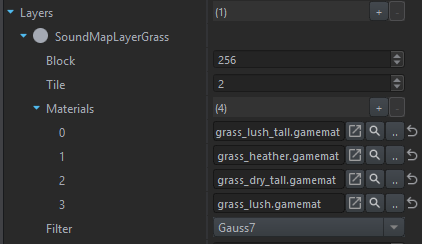
The AmbientSoundsComponent now features a "Grass" Signal, returning a value between 0 to 1 based on the amount of grass on the current SoundMap tile.
The detection can be set up in the SoundWorld entity using the "Layers" attribute. Here, materials that will be considered as grass can be defined, as well as a filter to adjust the fade-out behavior at zone edges.
SoundMap streaming
The terrain SoundMap is now streamed (instead of loaded into memory completely), which will reduce the memory footprint of large (sound)maps in particular.